GPT Image 2.6 GIFs: Frames, Presets, Costs, and Prompts That Loop
 GIFGenerator Team
How GPT Image 2.6 makes native GIFs: frames, timing, presets, real costs, prompts that loop.
GPT Image 2.6 generates real animated GIFs. Set output_format to gif in the Image API and the model returns a finished loop in a single file: 2 to 64 frames, each held on screen for 20 to 2000 milliseconds, the whole animation baked in. OpenAI shipped the model in ChatGPT and the API this week, and GIF support drew most of the launch coverage we reviewed.
This guide covers the frame system with measured numbers instead of press-release claims: the pixel budget that governs GIF size, four motion presets that turn frame math into loop design, the applications worth building first, and what a GIF costs. If you would rather skip the API entirely, our AI GIF generator wraps these endpoints behind a plain form.
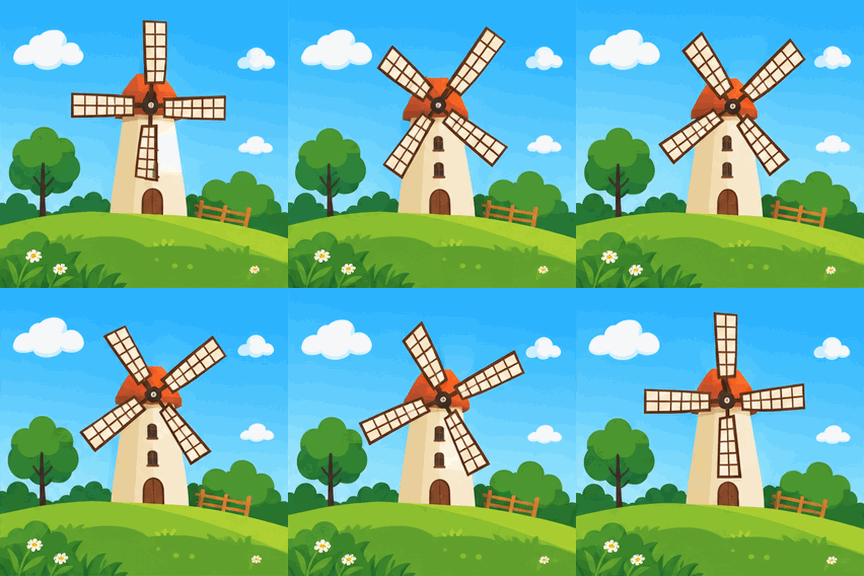
Sample output from fal's playground, generated with GPT Image 2.6 Flare: nine frames at 288 × 288, 200 ms each, looping forever. Why so small? The pixel budget section below explains.
What GPT Image 2.6 is, and where you can generate GIFs
GPT Image 2.6 is OpenAI's newest image model, released into ChatGPT and the Image API in early November 2026. OpenAI's own image generation guide lists the new capabilities: animated GIF output through the Image API, SVG output, markup-guided edits, and a complexity control. The company also published a system card covering GIF-specific safety work alongside the launch, which tells you GIFs shipped as a first-class feature rather than a hack on top of stills.
The API exposes two variants of the model:
- GPT-Image-2.6 Flare is the speed option. In hands-on testing by cellcog, a 12-frame mascot GIF at medium quality came back in about 11 seconds.
- GPT-Image-2.6 Sunburst is the precision option, tuned for consistency and detail. The same mascot prompt took roughly twice as long (22 seconds) at the same cost.
A practical split: draft your motion ideas on Flare, then regenerate the keepers with Sunburst.
You can reach the model three ways: through the ChatGPT app, which has its own consumer interface for GIF creation; through OpenAI's API directly; or through fal.ai, which hosts all four endpoints (Flare and Sunburst, each in a text-to-image and an edit version) with identical frame parameters. Our generator runs on the fal endpoints, so everything in this article applies to what it produces.
The GIF parameters in GPT Image 2.6
GIF output is a parameter, not a separate model. You describe a scene, set output_format to gif, and the request returns one animated file. The parameters that matter:
Parameter | Range (default) | What it does |
|---|---|---|
output_format | gif, png, webp, jpeg |
|
frame_count | 2 to 64 (9) | frames in the loop |
frame_duration_ms | 20 to 2000 (200) | how long each frame stays on screen, rounded to 10 ms |
image_size | presets or width × height | applies to every frame |
num_images | 1 to 10 (1) | GIFs per request; all their frames share one pixel budget |
background | auto, transparent, opaque | transparency works frame by frame |
quality | auto, low, medium, high (high) | dominates provider cost |
reasoning_effort | low to max (high) | more detail and latency per frame |
Two numbers describe any loop you can build: loop length equals frame_count × frame_duration_ms, and smoothness in frames per second equals 1000 ÷ frame_duration_ms. The defaults give 9 × 200 ms: a 1.8-second loop at 5 fps.
One pixel budget, shared by every frame
Every frame in a request draws from the same pool of pixels. fal's schema for the model states it plainly: "all frames of all outputs share the request's pixel budget." A request can carry between 655,360 and 8,294,400 total pixels, each edge maxes out at 3840 px, dimensions must be multiples of 16, and the aspect ratio can't exceed 3:1. Those limits apply to the sum of every frame you asked for.
Look back at the sample GIF above: nine frames at 288 × 288 is 746,496 pixels, which lands just above the budget minimum and sits in the same ballpark as a single 1024 × 1024 still. The frames are small because the budget is shared, not because the model can't render detail.
Some sizing math, derived from fal's published ranges:
- 9 frames: up to 960 × 960 per frame at the maximum budget
- 16 frames: up to 720 × 720
- 64 frames: up to 352 × 352
num_images multiplies the pressure. Asking for two GIFs of nine frames puts eighteen frames in the same pool, and each frame shrinks accordingly. When frame size matters to you, generate one GIF at a time.
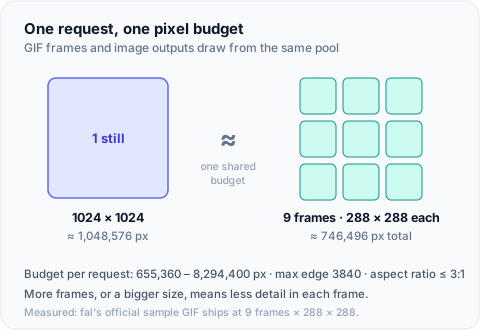
One still, nine frames: both fit inside the same per-request pixel budget.
The documented range is 2 to 64 frames, and fal's schema accepts it, but cellcog's runs against OpenAI's direct API got an HTTP 400 asking for 17 frames. Until you verify higher counts on your own endpoint, treat 16 as the reliable ceiling.
Four motion presets for loop design
Raw frame numbers are hard to reason about. What you actually feel when a GIF plays is two things: how long the loop runs and how smooth it looks. We mapped those two feelings onto four presets in the AI GIF generator, and each one expands to plain frame_count and frame_duration_ms before the request ever leaves our server:
Preset | Frames × duration | Loop | fps | Good for |
|---|---|---|---|---|
| quick-loop | 6 × 200 ms | 1.2 s | 5 | blinks, sparkles, meme punchlines |
| standard | 9 × 200 ms | 1.8 s | 5 | most loopable actions; the model's default rhythm |
| smooth | 16 × 125 ms | 2.0 s | 8 | character motion that needs continuity |
| buttery | 32 × 100 ms | 3.2 s | 10 | longer cycles; check the frame ceiling first |
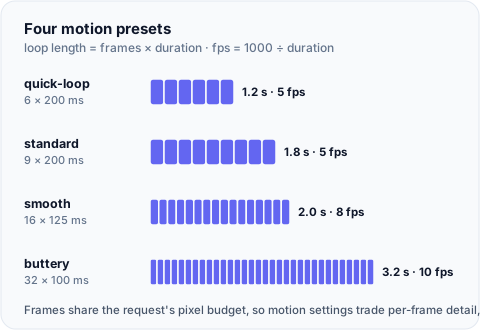
Loop length scales with frame count; fps comes from frame duration alone.
If a preset doesn't fit, explicit frame_count and frame_duration_ms values win. Compare the two loops that run almost two seconds: standard shows you nine distinct poses at 5 fps, smooth shows you continuous motion at 8 fps. Choose by what the loop needs to contain.
On our generator the presets cost the same as each other. Frames draw from the shared pixel budget rather than multiplying it, so a 32-frame loop bills like a 6-frame one.
What to make with GIF generation, and prompts that loop
The model returns a finished loop from one prompt, so the best-fit projects are ones where a short cyclic animation carries the message:
- Mascot and sticker loops for chat reactions, onboarding empty states, and reward animations. Set
backgroundtotransparentand the loop composites onto any UI, frame by frame. - Meme beats: a setup and a punchline frame that repeat forever, with no sound or play button needed.
- Social teasers of one or two seconds for a product launch. GIFs autoplay silently everywhere they're supported, which makes them the lowest-friction way to put movement in a feed post or email.
- UI micro-animations: loading states with personality, spinning icons, blinking indicators. Small canvases stretch the pixel budget further, so a 16-frame icon loop can stay crisp at 300 px.
- Ad variants. Same scene, different beat counts: a 6-frame version and a 16-frame version of one idea, run against each other.
A prompt pattern for loops that actually loop
Generation-only animation has one failure mode beginners hit immediately: the model renders beautiful frames that don't connect, so the loop jumps. Close that gap in the prompt itself. Five rules:
- Lock the camera. Write "static camera, locked framing" up front. Any drift breaks the loop.
- Describe one cyclic action by its beats. Not "a cat playing" but "a cat bats at a feather three times."
- Say the loop out loud. Add "seamless loop, first and last frames match." It helps the model plan the return path.
- Match the beat count to the frame budget. A 9-frame loop at 200 ms holds about three beats comfortably. Twelve beats in 1.8 seconds produces mush.
- Pick styles that survive small frames. Flat vector, sticker outlines, and pixel art read well at 300 px with 16 frames. Photoreal faces at that size turn to porridge.
A worked example for the default 9-frame loop:
Static camera, locked framing, centered subject. A tabby cat bats at a
hanging feather; the feather swings away and returns to its exact
starting position. Seamless loop, first and last frames match. Three
bat beats in 1.8 seconds. Flat vector sticker style, thick outlines.
Things to avoid: camera pans, scene cuts, on-screen text (it wobbles frame to frame unless the wobble is the joke), and fine facial detail at high frame counts. Every one of these patterns is testable in the AI GIF generator in under a minute.
Limits and costs
Reference images can guide a GIF
The GPT Image 2.6 API accepts image_urls alongside a prompt and can return
GIF output for an image-conditioned request. That gives an image-to-GIF path
when you want the model to reinterpret a reference image into a short loop.
When the frame sequence must stay exact, use the browser-side Images to GIF
converter instead: it combines existing stills deterministically and your
images never leave the browser.
A few smaller boundaries: frame timing rounds to 10 ms, streaming and partial images don't apply to GIF output, and each frame inherits the same image_size.
What a GIF costs
Billing is token-based, and quality dominates it. cellcog measured GIFs from $0.017 (4 frames, low quality) to $0.108 (16 frames, high) per file; the 12-frame mascot ran $0.056 at medium quality. Their verdict: "cost scales with frames, and GIFs are the most expensive thing 2.6 makes." On the direct OpenAI API, that's true.
On fal, the shared pixel budget changes the economics: since nine frames split the pixels a single still would consume, a GIF's provider cost lands close to one still of the same quality. That's how our credits are priced. A GIF bills as one image, 5 credits at low quality, 10 at medium, 15 at high, and frame parameters never move the number. That opens a cheap workflow: draft the motion at low quality for 5 credits, then regenerate the loop you keep at high quality for 15. The breakdown is on the pricing page, and any generation that fails refunds its credits automatically.
Safety rules are stricter for GIFs
OpenAI's system card devotes a section to GIF-specific risks: movement can carry meaning a still can't, so GIF content rules are tighter than still-image rules, and the card openly notes that motion-related violations remain challenging to detect. fal's safety checker runs on every request by default, and our API strips the parameters that could turn it off.
Generate a GIF without touching an API
Everything above reduces to three steps:
- Open the GIF generator and describe your loop. Use the five-rule pattern: locked camera, one cyclic action, beats that fit the frame budget.
- Pick a motion preset. Each shows its loop length and fps before you spend anything, and the credit cost is displayed up front.
- Download the file. If generation fails, the credits come back on their own.
You don't need a provider account or an API key, and you never touch a queue API. The presets, transparent backgrounds, and prompt box described in this article are all in there.
Frequently asked questions
How many frames can a GPT Image 2.6 GIF have?
The documented range is 2 to 64, with 9 as the default. In practice, cellcog's runs against OpenAI's direct API got an HTTP 400 asking for 17 frames, so treat 16 as a safe ceiling until you verify higher counts on your own endpoint. Frame count also trades against per-frame detail, because all frames share the request's pixel budget.
Can GPT Image 2.6 turn my photo into a GIF?
Not through the API's edit endpoints: GIF is a generation-only format there, and edits return stills. The ChatGPT app ships its own GIF creation features alongside the API, but that's a different product surface. Outside ChatGPT, the dependable route is assembling stills into a GIF yourself; our browser-based converter does it locally without uploading anything.
Why do GIF frames come out small or soft?
The pixel budget. Every frame in a request draws from the same 655,360 to 8,294,400 pixel pool, so nine frames at 288 × 288 sits in the same ballpark as one 1024 × 1024 still. Fewer frames buys more detail per frame; there's no setting that escapes the tradeoff.
How much does one GIF cost compared to a still image?
On the direct OpenAI API, more: measured GIFs ran $0.017 to $0.108 per file, and cost scaled with frame count. On fal, a GIF lands close to the cost of a single still of the same quality, because the frames share one pixel budget. On our generator that means a flat 5, 10, or 15 credits per GIF by quality tier, frames included.
Do GIFs get blocked more often than still images?
Potentially, yes. OpenAI's system card says GIF content rules are stricter than still-image rules because motion carries meaning across frames, and it acknowledges that motion-related violations are hard to detect. The safety checker runs by default on every request and can't be disabled through our API.